Convert CSV to GraphML with ease
You will get beautiful graphs in just 3 steps!

You will get beautiful graphs in just 3 steps!
In the presented image next to this description we gave you an example.
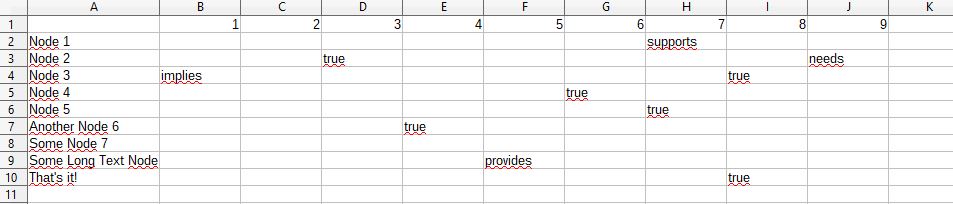
In this step, you should export the adjacency matrix into a 'comma separated values' (CSV) file you created in the previous step.
Keep care of the characters encoding, which should be 'Unicode UTF-8' at best. This is especially the case, when you use open document editing software like OpenOffice. If you are using Microsoft Excel, or have some bad characters you would probably go with 'ASCII' encoding. The proper encoding needs to be selected above the covnerter drag zone. By selecting 'ASCII', which only supports fixed 128 characters, special characters will be lost.
The generated CSV file can be then dragged into the import section of our converter tool below.
You should not exceed a file size larger than 1 MB, because you will result in an empty graph.
If everything went fine, you will result in a converted GraphML file which you will be offered to download.
The whole converting process is taking place 'in memory' and no external data is stored on our servers.
Our converted GraphML file is as small as possible, where no styling is applied. So this step is up to you! Layout the components to fit your needs.
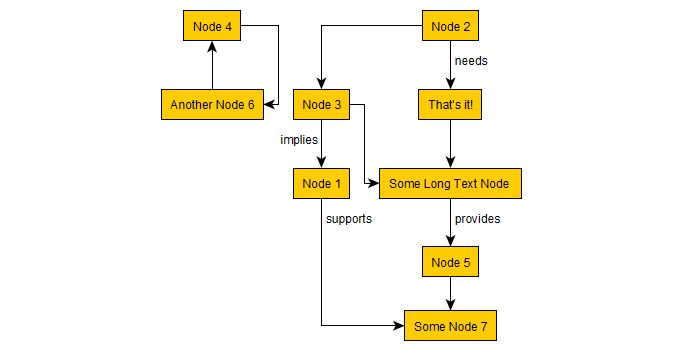
You can see the result for our example above in the attached image, where we used the preset 'FlowChart'.
Sometimes, instead of two you only want one undirected edge (with no arrows).
To do so you have to take care about two things.
Advertisement
Make sure you read the description above.
Merge edges?
Select encoding:
© Copyright 2017-2018 Gregor Kotainy - All rights reserved.